The Problem With Every Food Diary Ever Made
Logging is the input side of tracking. The output side — actually learning something from months of data — is where most apps stop at a handful of pre-built charts. Want to know whether your protein drops on days you eat out? Whether your spending spikes correlate with skipped workouts? Whether last month's "mostly healthy" was actually true? The data exists, but the app's dashboard never anticipated your question.
Large language models are exactly the right tool for open-ended questions over personal data. What's been missing is a safe, standard way to hand them the data. That's what MCP provides.
What Is MCP, in One Paragraph
The Model Context Protocol (MCP) is an open standard that lets AI assistants connect to external data sources and tools through a common interface. Instead of every app building a bespoke ChatGPT plugin and a separate Claude integration, an app exposes one MCP server, and any MCP-compatible client — Claude, ChatGPT, and a growing list of others — can connect to it. For personal data, this matters because the connection is explicit and scoped: the assistant can call the specific query tools the server exposes, and nothing else.
VoiceLog: A Food Diary Built to Be Queried
VoiceLog is a voice-first logger: you speak one sentence — "I had a chicken salad and an oat latte, ran 5K, and spent $14 on lunch" — and it files a meal with estimated calories and macros, a workout, and an expense, each as a structured entry. (New here? The voice calorie tracking guide covers the logging side.)
Because entries are structured from day one — meals with protein/carbs/fat, expenses with amounts and categories, workouts with distances and sets — they're queryable data, not free-text notes. With VoiceLog Pro's Connect AI feature, you pair your assistant with your logs, and the questions become conversational.
Questions You Can Actually Ask
Food and macros
- "What did I eat this week, and what was my average daily protein?"
- "Which meals kept me under 600 calories but over 40g protein?"
- "How did my weekday eating compare to weekends this month?"
- "Plan tomorrow's meals from things I've actually logged and liked." (More macro ideas in the macro tracking guide.)
Money
- "How much did I spend on eating out versus groceries this month?"
- "What broke my under-budget streak last week?"
- "List every expense over $50 since June 1." (See the voice expense tracking guide for the logging half.)
Cross-domain — where it gets interesting
- "On days I worked out, did I eat more protein or spend more on food?"
- "Summarize my week: calories, workouts, spending, and anything from my journal worth flagging."
- "Am I actually consistent, or just consistent on Mondays?"
This cross-domain layer is the real payoff of logging food, fitness, and money in one app: correlations between them are exactly the questions no single-purpose dashboard can answer, and exactly what an LLM with query access handles naturally.
None of these require you to formulate a query language or build a chart. You ask in plain English, the assistant calls the right query tools against your logs, and the answer comes back with the reasoning shown. Follow-ups work the way conversation does: "okay, now just the weekdays" refines the previous answer instead of starting over.
How to Set It Up
- Get VoiceLog on your iPhone (iOS 18+) and log for a few days so there's data worth querying.
- Start a VoiceLog Pro trial — Connect AI is a Pro feature (7-day free trial, then $12.99/month or $99.99/year).
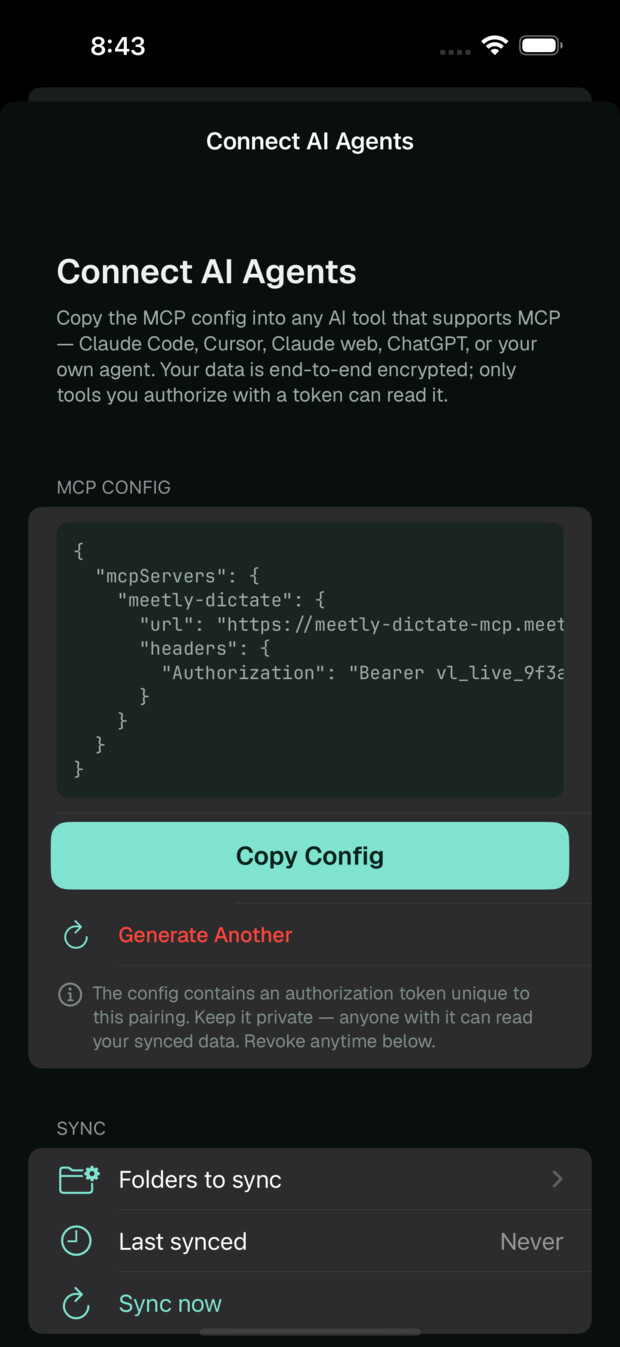
- Open Connect AI in the app and follow the pairing flow for your assistant — Claude, ChatGPT, or any MCP-compatible client.
- Ask your first question: "what did I eat today?" is a good smoke test.
The Privacy Model: You Choose What Syncs
Connecting health data to an AI assistant deserves a clear-eyed look at the plumbing, so here it is:
- Your voice never leaves the phone. Transcription runs on-device; only the finished text is saved.
- Nothing is shared by default. Logging works entirely locally. The MCP connection exists only if you set it up.
- You choose what syncs. You decide what data is available to a connected assistant — it's an explicit, revocable choice, not a background upload.
- The assistant sees query results, not your microphone. An MCP client can call the exposed query tools over your logs; it has no access beyond them.
One honest caveat belongs here: once query results reach Claude or ChatGPT, they're handled under that assistant's own data policies. If you wouldn't paste a piece of information into a chat window, don't sync it. The design goal is informed control, not magic.
Honest Limitations
A few things to know before you wire this up. The insights are only as good as the logs — calorie and macro figures are estimates from your descriptions, so treat AI summaries as directional, not clinical. Connect AI requires a Pro subscription, and VoiceLog itself is iOS-only (iOS 18+) and English-first today. MCP client support also varies: Claude and ChatGPT connect today, but each client's setup flow differs and the MCP ecosystem is still young, so occasional rough edges are part of the deal. And your assistant can misread data like it can misread anything — for consequential decisions, check the underlying entries in the app.
Frequently Asked Questions
Which AI assistants work with VoiceLog?
Claude, ChatGPT, and any client that speaks the Model Context Protocol. Because MCP is an open standard, new clients work without VoiceLog needing a bespoke integration for each one.
Can the AI change or delete my logs?
The connection is built for querying your data — asking questions and reading entries. Your logs live in the app, and editing happens there.
Does my audio get sent to Claude or ChatGPT?
No. Audio is transcribed on your iPhone and never leaves it. A connected assistant only ever sees text-based query results from the data you chose to make available.
Is the MCP connection free?
Connect AI is part of VoiceLog Pro — $12.99/month or $99.99/year with a 7-day free trial. Voice logging itself (meals, workouts, expenses, to-dos, journal) is free.
Can I disconnect later?
Yes — the connection is revocable at any time, and nothing syncs unless you've enabled it. Turning it off returns you to a fully local setup.
The Bottom Line
Logging your life is only half the job; the other half is being able to ask it questions. Voice makes the input effortless, structure makes the data queryable, and MCP hands the querying to an assistant you already talk to every day. That's a food diary that finally answers back.