Why Expense Apps Die From Friction
Manual expense tracking has a brutal cost structure: the benefit (awareness of your spending) arrives weeks later, but the cost (data entry) is due immediately, several times a day. Open app, tap add, type merchant, type amount, pick category, pick date, save. Do that for a coffee, a bus fare, and a grocery run, and you've spent more attention on logging than on any single purchase.
Bank-syncing apps try to solve this by importing transactions automatically, but they introduce their own problems: cash disappears from the picture, transactions show up days late with cryptic merchant names, categories need constant correcting, and you hand a third party read access to your entire financial life. Somewhere between "type everything" and "connect my bank account" there's a simpler answer.
- Manual entry: accurate but so tedious most people quit within a month
- Bank sync: automatic but delayed, cash-blind, and privacy-invasive
- Spreadsheets: flexible but the highest-friction option of all
Track Spending by Voice: The Five-Second Log
A voice expense tracker collapses the whole workflow into one sentence. With VoiceLog, you tap the mic as you leave the cafe and say:
"Spent $14 on lunch and $6.50 on a taxi."
VoiceLog transcribes the sentence on your device, pulls out both amounts, assigns categories, and files two expense entries. No forms, no dropdowns, no remembering to do it later. Because it happens at the moment of purchase, cash spending gets captured just as easily as card spending — the thing bank-sync apps structurally can't do.
And because VoiceLog parses natural language, the same recording can carry more than money. "Spent $14 on lunch — chicken salad and an oat latte — and remind me to cancel that subscription" files an expense, a meal with estimated calories, and a to-do in one pass. (Curious about the food side? See our voice calorie tracking guide.)
Receipts: Scan Instead of Speak
Some purchases don't fit in a sentence — a grocery run with thirty line items, a pharmacy receipt, a restaurant bill you're splitting. For those, VoiceLog Pro adds receipt scanning: photograph the receipt and the amount and details are extracted automatically. Voice for the small stuff, camera for the itemized stuff — between the two, there's no purchase that takes more than a few seconds to record.
Under-Budget Streaks: Making the Habit Stick
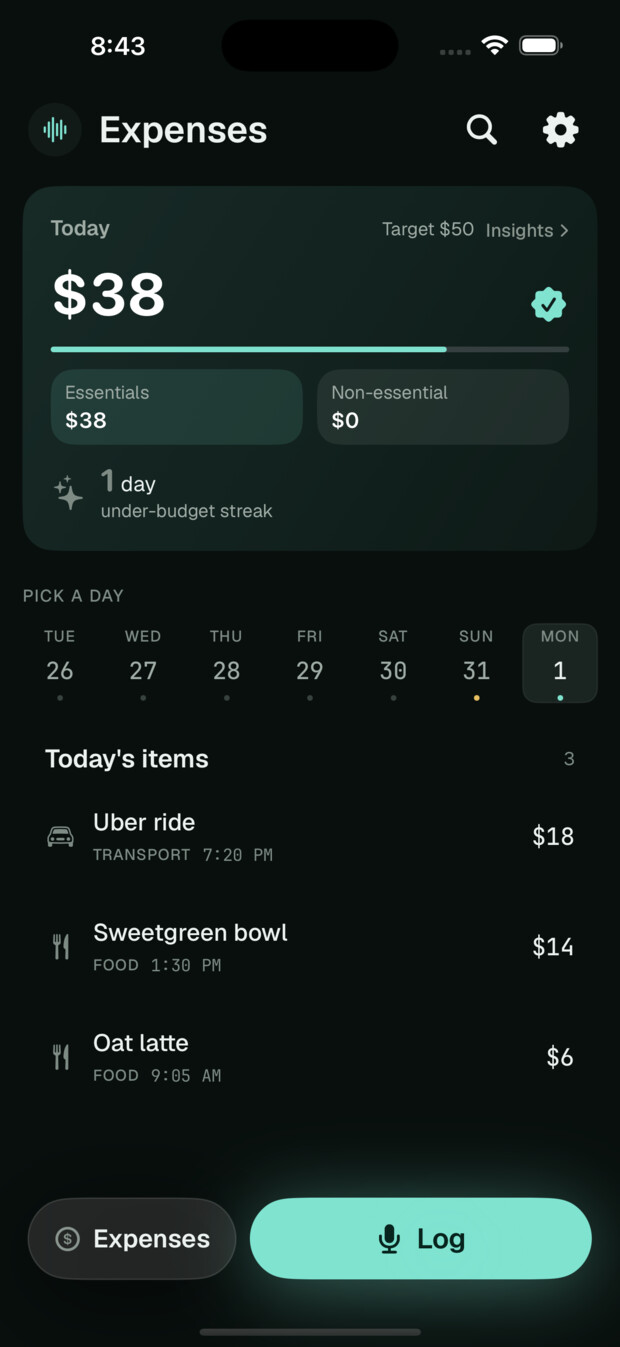
Logging is only half the battle; the other half is caring about the number. VoiceLog's Home screen shows today's spending alongside your calories, deficit, protein, and steps — one snapshot of the whole day. Stay under your daily budget and your under-budget streak grows.
Streaks work for spending the same way they work for exercise: they convert an abstract goal ("spend less") into a concrete daily win you don't want to break. A 12-day under-budget streak is a much stronger reason to skip an impulse purchase than a monthly pie chart you'll review — maybe — at the end of the month.
Getting started in one afternoon
You don't need a budgeting overhaul to begin. Pick a rough daily number you'd be happy to stay under, then just narrate purchases for a week without judging them. By day seven you'll have something no spreadsheet resolution ever produced: a complete, honest picture of where a normal week actually goes. Adjust the budget from evidence, not guilt, and let the streak take over from there.
How VoiceLog Compares to Other Ways of Tracking Expenses
| Approach | Effort per expense | Captures cash? | Bank access required? |
|---|---|---|---|
| Voice logging (VoiceLog) | ~5 seconds, spoken | ✅ Yes | ❌ No |
| Manual-entry budget app | 30–60 seconds of taps | ✅ Yes | ❌ No |
| Bank-sync app | Zero, but corrections needed | ❌ No | ✅ Yes |
| Spreadsheet | 1–2 minutes at a desk | ✅ Yes | ❌ No |
Ask Your AI Where the Money Went
Logged expenses become genuinely useful when you can interrogate them. VoiceLog Pro lets you connect AI assistants — Claude, ChatGPT, or any MCP-compatible client — directly to your logs. Ask "how much did I spend on eating out this month?" or "compare my grocery spending to last month" and get an answer computed from your actual entries, not a canned chart. We cover the setup and example queries in our MCP guide.
Privacy: Your Spending Stays on Your Phone
Spending data is intimate — it maps where you go, what you eat, and what you struggle with. VoiceLog transcribes your voice on-device, so the audio never leaves your phone. Only the finished text is stored, there's no bank connection at all, and your data only syncs to other devices if you turn sync on. You choose what leaves the device, if anything.
Honest Limitations
Voice expense tracking is deliberately simple, and that has edges. You still have to say the sentence — if you forget to log a purchase, it won't appear the way a bank feed would surface it, so the system rewards a small habit of logging as you pay. Categories are inferred from what you say and occasionally need a correction. VoiceLog is English-first today and iOS-only (iOS 18+), and it's a personal tracker, not an accounting tool — no double-entry books, invoicing, or multi-currency reports. If you need reconciled statements for a business, pair it with proper accounting software; VoiceLog's job is to make your day-to-day spending visible with near-zero effort.
Frequently Asked Questions
How do I track spending by voice in VoiceLog?
Tap the mic and say the purchase naturally — "spent $23 at the grocery store" or "$4.50 coffee." VoiceLog extracts the amount and category and files an expense entry. You can mention several purchases in one recording.
Does VoiceLog connect to my bank account?
No, and that's by design. There are no bank credentials to hand over and no transaction feed to a third party. You log what you spend, by voice or receipt scan, and the data stays under your control.
Can it handle receipts with many items?
Yes — VoiceLog Pro includes receipt scanning. Photograph the receipt and the details are extracted automatically, which is faster than dictating a thirty-item grocery run.
What does the under-budget streak do?
Each day you finish under your daily spending budget, your streak grows. It turns "spend less this month" into a daily win you can see on the Home screen next to your calories and steps.
Is voice expense logging free?
Yes, voice expense logging is part of the free app. VoiceLog Pro ($12.99/month or $99.99/year with a 7-day free trial) adds receipt scanning, AI assistant connections, longer recordings, and cross-device sync.
The Bottom Line
The best expense tracker app is the one you're still using in month three. Voice logging survives where forms and spreadsheets don't because it costs five seconds and zero willpower. Say it, forget it, and let the streak do the motivating.